Tip: Integrate Xiaomi Mi Flora Plant Sensor

Homepage Forums OSPi Tip: Integrate Xiaomi Mi Flora Plant Sensor

Viewing 4 posts - 1 through 4 (of 4 total)
  • Author
    Posts
  • #31880
    Admin
    Keymaster

    Thanks to the integrated Bluetooth function of the Raspberry Pi (older models require a Bluetooth USB dongle), certain Bluetooth sensors can now also be integrated. One of them is the “Xiaomi Mi Flora Plant Sensor”, which is available in stores for around 25-30 EUR.

    The sensor has 4 interesting values: soil moisture, temperature, brightness and conductivity, the last being the soil nutrient content.

    The project we need for this is here:

    https://github.com/ThomDietrich/miflora-mqtt-daemon

    In principle you can proceed exactly as in the instructions. In OpenSprinkler you simply set up an MQTT sensor and link it to the topic “miflora/<sensor name>”, where <sensor name> is the name that you entered in the config.ini.
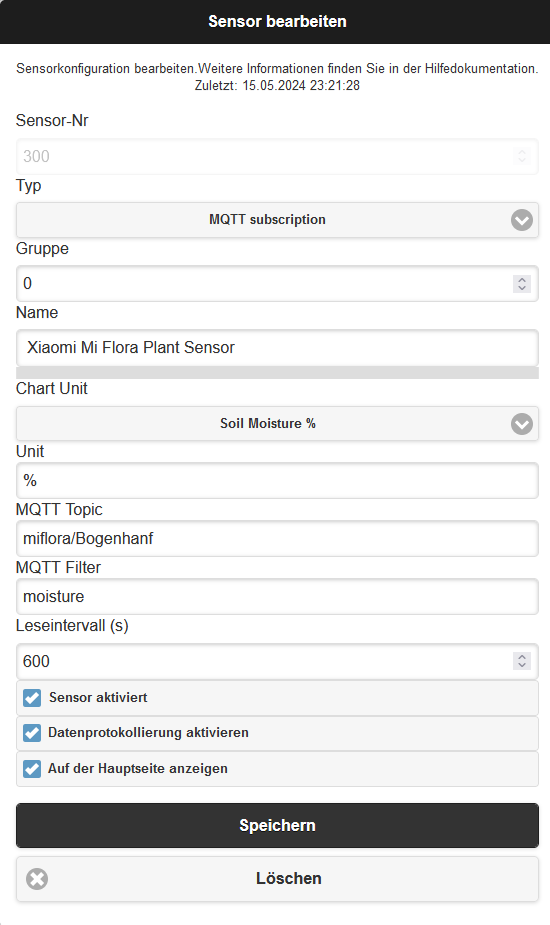
    Another note: Bluetooth scanning with “sudo hcitool lescan” didn’t work for me because the hcitool has probably already been discontinued. Instead, “sudo bluetoothctl scan le” should work.

    #32033
    Thomas Thaler
    Participant

    Raspberry Pi 3 Model B Plus Rev 1.3, BCM2835, Revisiona020d3, Debian GNU/Linux 11 (bullseye) 64bit

    The specified command “Instead should be “sudo bluetoothctl scan le” ” is not correct.
    To search for Bluetooth you can either use “sudo bluetoothctl scan on” or “sudo hcitool lescan”. Worked for me with both commands.

    #32057
    Thomas Thaler
    Participant

    In OpenSprinkler you simply set up an MQTT sensor and link it to the topic “miflora/<sensor name>”,

    I was hoping that after configuring the MQTT broker settings, somewhere in the OSPI UI there would be a way to integrate the MiFlora sensor set up above into the OS. Unfortunately, I didn't find any entries about this and I didn't find any instructions anywhere that explain how to integrate MQTT sensor data into the OS and make it visible and usable in the UI.

    The sonsor is successfully recognized by the miflora-mqtt-daemon.

    python3 /opt/miflora-mqtt-daemon/miflora-mqtt-daemon.py
    Xiaomi Mi Flora Plant Sensor MQTT Client/Daemon
    Source: https://github.com/ThomDietrich/miflora-mqtt-daemon
    [2024-05-10 10:57:41] Connecting to MQTT broker…
    [2024-05-10 10:57:41] MQTT connection established
    Adding sensor to device list and testing connection...
    Name:          “TEST”
    Internal name: “TEST”
    Device name: “Flower care”
    MAC address: 5C:85:7E:12:D2:27
    Firmware:      3.3.6
    [2024-05-10 10:57:44] Initial connection to Mi Flora sensor “TEST” (5C:85:7E:12:D2:27) successful
    [2024-05-10 10:57:44] Announcing Mi Flora devices to MQTT broker for auto-discovery …
    [2024-05-10 10:57:44] Retrieving data from sensor “TEST” …
    [2024-05-10 10:57:45] Result: {“light”: 1042, “temperature”: 22.9, “moisture”: 0, “conductivity”: 0, “battery”: 100}
    [2024-05-10 10:57:45] Publishing to MQTT topic “miflora/TEST”
    [2024-05-10 10:57:45] Sleeping (300 seconds) …

    Thanks for the feedback, as I now have the sensors and would like to integrate them into OSPI
    Best regards
    Thomas

    #32075
    Admin
    Keymaster

    Hello,

    The whole thing does NOT work with the original software, but only with the extended OpenSprinklerShop software.

    https://OpenSprinklerShop.de/2023/09/06/neue-ospi-software-mit-analog-sensor-api/

    And only with the “OpenSprinklerASB” app

Viewing 4 posts - 1 through 4 (of 4 total)
  • You must be logged in to reply to this topic.