Shop
Shop Configurator
Control zones with RS485 Modbus
From firmware 2.3.3(180) RS485 Modbus devices can also be controlled via the zone control.
e.g.
- relay
- RS485 ball valves
- additional ON/OFF RS-485 components
The control can be done via a USB – Modbus adapter (OSPi only) or via TCP-Modbus (OSPi + OpenSprinkler 3.x).
For this to work, each device must have a unique ID. OpenSprinkler / OSPi acts as a master and does not require an ID. How to set the IDs can be found in the respective device documentation.
configuration
The prerequisite is the use of the OpenSprinklerShop firmware!
There is no further configuration for OpenSprinkler 3.x; you enter the IP address and port directly for the zones.
For OSPi there is the rs485 file in the firmware folder. The USB device should be here, e.g.: \\dev\ttyUSB0 for the first USB port. For more information, please use “lsusb -v”
If you want to use a Modbus-TCP adapter with the OSPi, then enter <ip-address>:<port> in the file
parameter
Then configure the zones as follows:
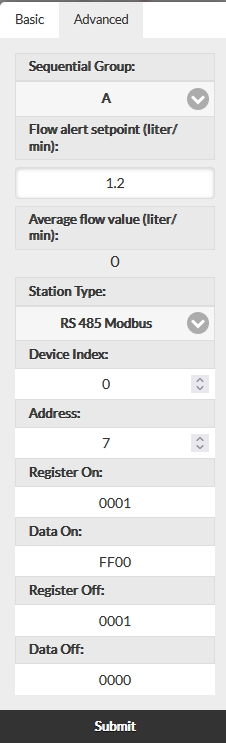
- Device Index: Modbus device ID
- Address: Modbus address
- Register On: Modbus register for “ON”. Use hexadecimal notation
- Register Off: Modbus register for “OFF”. Use hexadecimal notation
- Data On/Off: Data for “ON” or “OFF”