Shop
Shop Configurator
Troubleshooting OpenSprinkler/OSPi
Below, the OpenSprinkler management interface, which is available via Android or IOS app or web interface, is simply referred to as an app.
The following information applies to all OpenSprinkler variants (except Latch), including OSPi. The “display” takes place in the app.
This guide is intended to help you if one or more OpenSprinkler solenoid valves are NOT opening or closing.
- If a solenoid valve can be opened but not closed, there is a defect in the solenoid valve or it is a solenoid valve that does not fit the OpenSprinkler version. Self-holding valves can only be used with the OpenSprinkler Latch version, 24VAC valves only with OpenSprinkler AC and DC. 12VDC valves only with OpenSprinkler DC.
- If a solenoid valve CANNOT be opened, please first check whether there is water in the pipe. Some valves do not open at all if there is no water in the pipe. Most valves click when opening and closing. With many valves, the solenoid coil can be unscrewed from the valve. This makes it much easier to check whether the valve or the solenoid is the problem. If the valve does not click when activating the irrigation circuit, check the wiring first.
Manufacturing information for fault diagnosis: https://openthings.freshdesk.com/support/solutions/articles/5000859137-troubleshooting-and-technical-help
A) Wiring check
Open your OpenSprinkler app and open a watering circuit directly from the home page. Enter 1 minute as the running time.
1. The display shows 0mA – 30mA
Either a cable is damaged somewhere, there is no solenoid valve connected or the onboard fuse (AC versions only) has blown. Check the fuse on the circuit board.
Disconnect the power supply
a) Disconnect both green plugs from OpenSprinkler.
Take a meter and measure resistance between COM and a valve (on the green connectors), it should about 75 ohms be.
If it is infinite or in the megaohm range, then there is no longer any connection.
However, if it is less than 5 ohms, then you probably have a short circuit on the wires.
(The resistance values refer to a Rainbird 100 HV solenoid valve. Other manufacturers have similar values)
b) Plug the two green plugs into your OpenSprinkler
and restore power.
Take a meter and measure the voltage between COM and the affected irrigation circuit. Then use the APP to open this irrigation circuit.
– OpenSprinkler DC: Measure DC voltage (V=). The voltage should show approx. 7.0-13V (or the voltage of the power source)
– OpenSprinkler AC: Measure alternating voltage (V~). The voltage should show around 22-28V
– OpenSprinkler Latch: Measure DC voltage (V=). Since only short pulses occur, you have to open and close the irrigation circuit several times in order for a measurable value to appear.
If no voltage can be measured on an active irrigation circuit, then the OpenSprinkler is defective. Contact the OpenSprinkerShop Service.
Note on the AC version (also OSPi): If you without a connected solenoid valve measure the voltage between COM and a zone, then you always measure 24VAC. The reason is the technology used, the triac components always require a power consumer to switch. Therefore, always measure the voltage with a connected solenoid valve!
DC boost time: The OpenSprinkler DC has a “DC Boost Time” option in the settings. If a valve does not open completely, you must increase this value. This value defines the time in which the voltage is “turned up”. Background: To open a 24VAC valve with direct voltage, it only needs a large starting pulse to get enough opening energy. The valve will then continue to be supplied with the normal power supply voltage.
LATCH Boost time: The OpenSprinkler Latch has a “Latch Boost Time” option in the settings. If a latch solenoid opens but cannot close or vice versa, then adjust the boost times, in this case lengthen the pulse.
c) Current measurement (Attention: Only for professionals!)
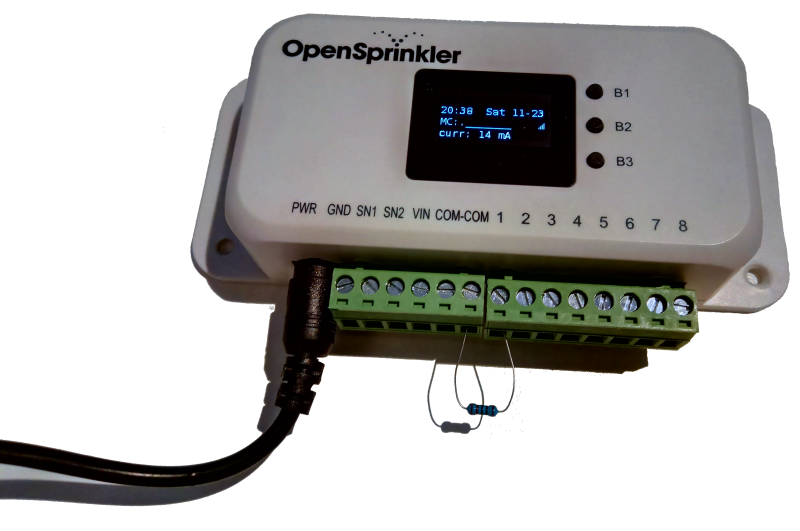
Alternatively, a current measurement can also be carried out. Danger: A current measurement must ALWAYS be made via a consumer. NEVER measure without a consumer! Always measure consumers in series, never in parallel! So that's right Com->Consumer->Meter->Irrigation circuit. To use the internal display, the consumer should have 75-250Ohm and only be measured for a few seconds. If you don't have a solenoid valve handy, you can also use a standard resistor to measure the current. For example, a 180Ohm resistor on an OpenSprinkler should read DC 19-24mA. A 220Ohm resistor approx. 14mA. Since the resistor gets very hot, do not do this test for longer than 10 seconds!
2. The display shows over 900mA
Immediately close the irrigation circuit of your OpenSprinkler using the app or pull the power plug
There is probably a short circuit or water fault in the wire pairs. Repair the short circuit and measure the line as under 1a. through.
B) Programs do not switch at the desired time
Check the following settings in OpenSprinkler
- Is the program active and is it at the correct time?
- Does OpenSprinkler have the correct time AND time zone? In the options you should check your location, time zone and device time under “System”. Under “Advanced” you can set your own time server with “NTP IP address”, e.g. your Fritz!Box. The “NTP Sync” option must be active for the time to be set automatically. If you would like to set the time of your OpenSprinkler manually, DEACTIVATE the “NTP Sync” option, then you can enter the time manually under “System”.
- If you use the weather service, it may happen on rainy or cool days that the water level is at 0%, i.e. according to the weather service it is wet enough to suspend watering. If you do not want this, deactivate the “Use weather service” option in the program. Alternatively, you can activate the “Ignore Rain” option in the irrigation circuit. This is necessary, for example, in the greenhouse so that watering can still take place when it rains.
C) Device constantly restarts (bootloop) – firmware reset / factory reset
A bootloop (the device keeps restarting or gets stuck at the start screen) is usually caused by a corrupt configuration. In this case one helps Factory reset (Reset to factory settings).
⚠️ Danger: A factory reset deletes all settings, programs and zones. If the device is still accessible, back up your configuration first via the app (export/backup).
Variant 1: Factory reset using the buttons (OpenSprinkler v3 / AC / DC)
- Disconnect the OpenSprinkler from the power supply.
- Hold the button B1 pressed and restore power.
- Hold B1 continue to be pressed until the reset menu or “Factory reset?” appears in the display. appears.
- Confirm the reset (with Hold B3 = save). The device is reset to factory settings and restarts.
Note for ESP32-C5 models (Zigbee/Matter): When holding B1, the firmware selection appears first (B1:ZB B2:MAT B3:OK). Choose here nothing off – wait for the next menu item or press B3 without selection to get to the factory reset menu.
Variant 2: Reset WLAN only (Reset to AP)
If the device no longer comes into the network because of incorrect WLAN access data (settings should be retained):
- Hold B3 pressed and press additionally B2.
- Confirm “Reset to AP?”
The device then starts in access point mode (WLAN “OS_…”), programs and settings are retained.
Variant 3: Factory reset via app / web interface
If the device is still accessible: Options → System/Advanced → “Factory reset” activate and confirm. The password is retained.
Variant 4: Reinstall firmware (hard bootloop, display gets stuck)
If key access no longer helps and the device no longer starts at all:
- ESP based models (v3): Reinstall the firmware via USB and completely delete the flash (“erase flash”). Firmware and instructions can be found at Downloads.
- OSPi: Configuration files (
iopts.dat,sopts.dat,stns.dat) or set up the software again.
If the device continues to hang in a bootloop even after the factory reset, there is probably a hardware defect - in this case, contact them OpenSprinklerShop service.