
 Shop
Shop Configurator
Beta Test Irrigation Service
- This topic has 20 replies, 4 voices, and was last updated 3 years, 6 months ago by
Admin.
-
AuthorPosts
-
12. May 2022 at 20:52 #25581
Mathias Stöber
ParticipantHello everyone,
First of all, thank you for trying to improve the weather service! I just tried to set it up as described in the blog post, but all I get is a message that there was a “connection failed”. I have a Raspi with OSPI firmware 2.1.9(9).
However, when I call up a “curl OpenSprinklerShop.de:3333” from my desktop I get “OpenSprinklerShop weather service germany v2.0.4” as an answer.
I restarted the OpenSprinkler via the website, as well as the entire Raspi.
Any idea what this could be?
VG Mathias
13. May 2022 at 19:58 #25587ParticipantHi,
Short update from me. Yesterday I changed everything back to the default so that the automatic irrigation system would work this morning. This morning I tried again, first with the same result as described above. But after about 6 hours or more, the error message disappeared and the app only displayed the message as described in the blog post and weather data was displayed again. I'll keep doing it this way now.
If necessary, it would be good to have a note in the blog that the first update can take several hours.
Thank you again!
See Mathias
19. May 2022 at 11:49 #25631Admin
KeymasterHello,
This is probably due to the OpenSprinkler firmware used, the older version has problems with DNS resolution immediately after rebooting.
Either update the firmware or enter the ip (OpenSprinklerShop.de = 130.180.44.149)
19. May 2022 at 12:22 #25635ParticipantHi,
Thank you for the hint. Since it is an OSPI, I have firmware 2.1.9(9), as far as I know there is no newer version. I may have to configure the systemd service a little differently so that it waits until the network is actually up.
Otherwise the query is definitely more accurate than before!
Thank you for that!
Mathias
19. May 2022 at 21:42 #25637Anonymous
InactiveGood bye,
Yesterday I also tried to enter the weather service with port 3333 as described in the blog post.
Since yesterday there was an error and “Building Weather History”.I saw earlier that there is another weather service with port 3336.
Entered this and it worked immediately, “Weather service online”.Latest firmware 2.1.9(9).
Best regards
Matthias19. May 2022 at 22:04 #25638KeymasterHere all servers:
OpenSprinklerShop.de:3333 : DWD German Weather Service, only for Germany (https://brightsky.dev)
OpenSprinklerShop.de:3334 : OWM OpenWeatherMap (https://openweathermap.org)
OpenSprinklerShop.de:3335 : DarkSky (https://darksky.net) <— Don't use it, it's just a test!
OpenSprinklerShop.de:3336 : OpenMeteo (https://open-meteo.com)20. May 2022 at 6:17 #25645InactiveThanks for the listing.
As I said, they all work for me except the first one with port 3333.
It will look like the attached photo.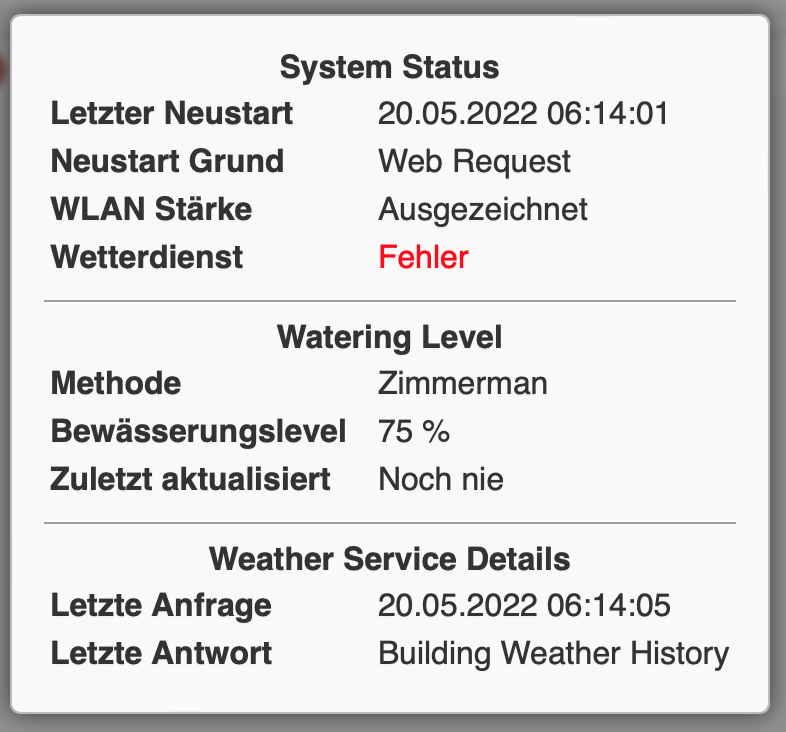 22. May 2022 at 0:18 #25664Keymaster
Hello,
yes thanks, found it, it's now repaired.
So port 3333 is now also running.
2. July 2022 at 21:06 #25917ParticipantHi,
Something is strange today. I use the dwd service, see above, but even though not a drop of rain fell here today, the ospi says it doesn't need to water because more than 7mm of rain would have fallen. The dwd app doesn't show any precipitation for today either. There may have been a problem yesterday because he drove the sprinkler at 120% in the heaviest rain.
I use eto as a method, it has worked wonderfully since the posts above. It almost looks like the data is shifted by a day.
Thank you very much in advance!
See Mathias
2. July 2022 at 21:17 #25918InactiveHi,
now that you mention it...
Exactly the same for me, also DWD, i.e. via port 3333.
Yesterday it rained all day, 90% watered.It didn't rain a drop here today either, the irrigation level was 0% and the total rain was 7.9mm.
Something is wrong, my guess would also be that the data is delayed by a day.
Thank you very much and best regards
Matthias2. July 2022 at 21:31 #25919ParticipantHehe,
Do we not only have almost the same name but also the same location? For me it's 7.9 too. Do you happen to also have the weather station for the Braunschweig region?
See Mathias
3. July 2022 at 21:19 #25925InactiveHi,
no, not quite. My system is in the Bamberg district. But it's quite interesting that they apparently have the same values.
Greetings, Matthias
5. July 2022 at 12:35 #25932InactiveHi to all testers and the admin,
I also wanted to take part in the test, but so far without success. I had to put IP address:8080/su after my OSPI to do the input
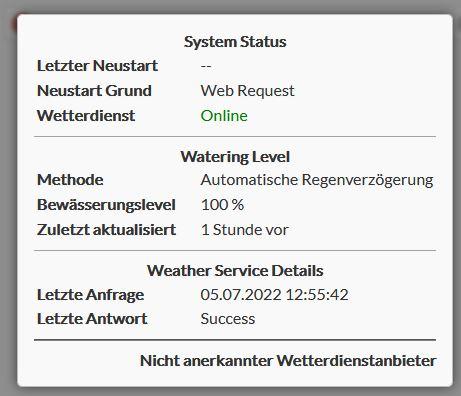
I have tried all of the addresses of the new weather services, and for each one I get an error message (see appendix) under System Daignose. It doesn’t matter whether I use “OpenSprinklerShop.de” or the IP mentioned above. After restarting and querying again http://<ip-OpenSprinkler>:8080/su but the changed entry appears, e.g. OpenSprinklerShop.de:3333. However, the error under system diagnostics remains.
Do I have to change entries or configurations elsewhere? Could it be because I currently have manual irrigation set and not, for example, Zimmermann? I have been running OSPI for three years and currently on the current firmware 2.1.9 (9).
Thanks for the support and best regards, HG
5. July 2022 at 13:39 #25935ParticipantI think that's normal, it went away for me after a few hours.
See Mathias
5. July 2022 at 14:50 #25936InactiveTrue, it takes a while, but it works now.
-
AuthorPosts
- You must be logged in to reply to this topic.