Shop
Shop Configurator
OpenSprinklerShop firmware
The following information is outdated and only listed for historical reasons:
The new version of the OpenSprinkler firmware WITH extension for the Analog sensor board as well as the new one Truebner RS485 adapter.
NOTE: This article applies to OpenSprinkler 3/3.2/3.3/3.4 and OSPi
This version is based on the original firmware from the manufacturer (OpenSprinkler.com), but is mine additionally adjusted.
What's new is:
- Cloud access via Openthings.io Cloud Token (NEW: ALSO OSPi!!!)
- Grouping zones
- New irrigation control through new scheduler
- New weather-specific method: Monthly values
- Analog Sensor API: Connect analog sensors and use them to control irrigation
- Monitoring and Control: Define rules that trigger actions
Changes in version
Please note: There is no manufacturer support (from the USA) for the modified firmware, only through this Support page as well as that forum!
** You can access the newer version via the new online update. To do this, use the OpenSprinklerASB APP or the web interface **
NEW in 2.4.0 194 from April 6th, 2026
- MCP server integration also for OS 3.2/3.3/3.4
- Inverse zone logic switchable
- Auto update improved
NEW in 2.4.0 190 from March 31, 2026
– Now use the auto-update function to update
– Alternatively: Download link here
NEW in 2.4.0 186 from March 15, 2026
** ATTENTION: Save the configuration of the firmware AND also the configuration of the analog sensor configuration!! **
– ONLINE Updater: Update the firmware with just one click
– Runtime statistics: Shows the runtimes in a chart
– New notifications: Breach and Leakage detection
- Attention known problem: Email notifications can trigger reboot, stay with firmware 2.3.3 (184)
Download the new (modified) firmware 2.4.0 (186)
NEW in 2.3.3 185 March 7, 2026:
GENERALLY:
- **Unified Pinger** (2026-02-18): New cross-platform `Pinger.h` implementation for ESP8266, ESP32 and Linux/OSP
– 3-stage ping strategy: Gateway → google.com → OpenSprinkler.com
OpenThings Framework (OTF):
Version has been removed because some customers reported problems with it.
NEW in 2.3.3. 184 01/16/2026:
- Merge the latest firmware changes from OpenSprinkler.com for OS 3.4
Download the new (modified) firmware 2.3.3(184)
NEW in 2.3.3. 183 02.11.2025:
- Improved water meter calculation for overlapping irrigation
- Improved water meter calculation for non-overlapping irrigation or in combination with negative start times
Download the new (modified) firmware 2.3.3(183)
NEW in 2.3.3 182 September 21, 2025:
- ARP Proxy Fix
- Improved water meter calculation for overlapping irrigation
- Tennis Court: New program start and stop commands
Download the new (modified) firmware 2.3.3(182)
NEW in 2.3.3 181 August 25, 2025:
- Support for FYTA sensors
Download the new (modified) firmware 2.3.3(181)
NEW in 2.3.3 180 August 17, 2025:
- Support for RS485 Modbus stations (See also here)
Download the new (modified) firmware 2.3.3(180)
NEW in 2.3.3 178:
- Monitoring and control: New option “Reset in (s)” for a time-controlled reset of the monitor status
- Latch: Stop all irrigation circuits: If no program or zone is running and this function is called, then all zones receive the stop pulse again
Download the new (modified) firmware 2.3.3(178)
NEW in 2.3.3 177:
- Virtual sensors for ETO and Radiation (needs weather service that supports this)
- Fix for some W5500 adapters, adjusted to 40MHz
- Calculation of sunrise and sunset using internal formulas (instead of weather service)
Download the new (modified) firmware 2.3.3(177)
NEW in 2.3.3 176:
- Latest master branch of OpenSprinkler firmware installed (07/11/2025)
- ARP table with 40
- W5500 at 80MHz, ENC28J60 at 20MHz for faster network transmission
Download the new (modified) firmware 2.3.3(176)
NEW in 2.3.3 175:
- Latest master branch of OpenSprinkler firmware installed
- BugFix: OSPi: ADS1115 too many open files error
- New type for “Monitoring and Control”: TIME for time-dependent events
Download the new (modified) firmware 2.3.3(175)
NEW in 2.3.3. 174:
- Added Lumen and Lux units
- Filter when logging: Data identical to the predecessor is no longer saved
- BugFix: Empty MQTT filter resulted in no value.
- BugFix: OSPi RS485 SMT100 read error
Download the new (modified) firmware 2.3.3(174)
NEW in 2.3.3. 173:
- Bugfix MQTT: Values were only read with a filter, now also without a filter
Download the new (modified) firmware 2.3.3(173)
NEW in 2.3.3. 172:
- Added support for Truebner TH100
- Added internal Raspberry Pi temperature sensor
- Added advanced monitoring and control logic: AND, OR, XOR, NOT and rain sensor
Download the new (modified) firmware 2.3.3(172)
NEW in 2.3.3. 171:
- RESET_STATION_BITS fixed
- Timed program start fixed
- broken mqtt+influxdb fix
Download the new (modified) firmware 2.3.3(171)
NEW in 2.3.3. 170:
- Improved flow warning: Each zone now has a flow warning option (app update 156 required)
- Improved flow warning: Each zone stores the average water flow of the last run per zone (evident with App Update 156 required)
- App Update 156 with push notifications for “Monitoring and Control” notifications
NEW in 2.3.3 169:
- “Monitoring and Control” now shown with Priority, Low=green, Medium=yellow and High=red on the front panel
- “Monitoring and Control” now with MQTT and email notification
- Fix: InfluxDB and email enabled at the same time
- New OpenSprinklerASB APP available!
NEW in 2.3.3 168:
- OSPi: Support of USB-RS485 adapters with control of Truebner SMT100 and Aquaflex sensors
- New “Monitoring and Control” function for sensor value-dependent control of programs and zones. This allows you to define and execute event-controlled actions, e.g. if the cistern level is below the minimum value, refilling starts until a minimum value is reached, or the ventilation system starts when the humidity/temperature is high
More about this on the new page “Monitoring and Control”.
Attention, please backup the configuration! Due to configuration changes, all settings are now reset!
NEW in 2.3.2 167:
- InfluxDB support: use InfluxDBin order to manage the measured data centrally and evaluate it in a targeted manner (after installation, click on “Arduino” and then continue to “Initialize Client”, the access data will be below).
- Flow Alert: This option notifies you when a program is running but no water is flowing. Can also be used as leak detection. Instructions are here
(Quick guide: Works with a connected pulse water meter and only if the station name contains the last 5 characters of a number with the minimum amount of water in liters of water flow, e.g. “Lawn 05.00”. Option must be activated. Station must run for at least 2.5 minutes) - Sensor API: /sn parameters “before” and “after” to clean the measurement data depending on the time range (see Sensor API.txt on github).
Attention, please backup the configuration! Due to configuration changes, all settings are now reset!
NEW in 2.3.2 166:
- Support for email notifications (Instructions for Google email with app password can be found here)
- OSPi: New OpenThingsFramework with more stable OTC connection
- Merge the changes from OpenSprinkler 2.2.1(1).
Attention, please backup the configuration! Due to configuration changes, all settings are now reset!
NEW in the 165:
- Added support for Trueber RS485 adapter
- Flow meter optimization, up to 200 ticks/s
- Zero pointer fix
- program adjustment preview
- Added /du log size diagnostics
- Added board detection
NEW in the 164:
- OSPi with systemd start script. Installs and activates automatically when you update the firmware with “sudo ./updater.sh”.
- https station fix
- Shorter timeout for remote sensors to avoid blocking.
NEW in the 163:
- OS3x Latch: Bug fix zone expander latch adjustment
- OSPi: OSPi bug fix memory free/delete
- OSPi: Fixes rain delay date
NEW in the 162:
- Bugfix release: Correction of the MQTT password implementation, longer passwords are now possible
NEW in the 161:
- Bugfix release: Correction of a buffer overflow in the sensor log display of the charts
NEW in the 160:
- OSPi: OpenThingsFramework. The OSPi version now catches up with the OpenSprinkler 3.x version and enables remote access via OTC tokens! For details see “Remote access via Openthings.io Cloud” below
- OSPi: Support for OSPi 1.6 2xADS1115
- MQTT: Host, username and password now longer: Host: 100, User: 50, Password 100 characters
- MQTT: Handling improved, reading out with zero values no longer reads the following value
- OS3x: Better detection of the ENC28J60/W5500 network adapters
NEW in the 153:
- Digital noise filter for the analog inputs on the “Analog Sensor Board”.
- Improved handling of MQTT subscriptions
Full list of all changes can be found in GitHub
OR the official firmware 2.2.1: Here
A. OpenSprinkler 3.0 – 3.4:!! First backup your configuration!! The exact instructions for installing ONE update can be found here: This is how the firmware update works |
E.g. OSPi
!! First backup your configuration!!
OSPi firmware to compile yourself!
The source code is available here:
https://github.com/opensprinklershop/OpenSprinkler-Firmware
https://github.com/OpenSprinklerShop/OpenSprinkler-App
https://www.youtube.com/watch?v=T2rB39s4x78
This is how it goes
1. Remote access via Openthings.io Cloud
The function is fully explained here.
2. Grouping zones
This new feature replaces the old “sequentially” feature, which allows you to control whether zones are watered simultaneously or sequentially.
With the group function (these are the letters on the circuits), zones with the same group (e.g. all zones with group A) run one after the other, but other zones with different groups (e.g. with groups A, B and C) run simultaneously. Adjustable with the gear.
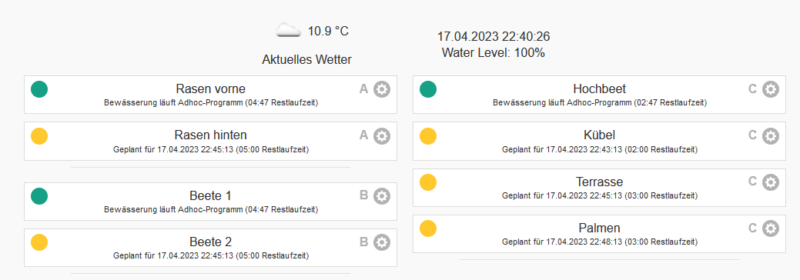
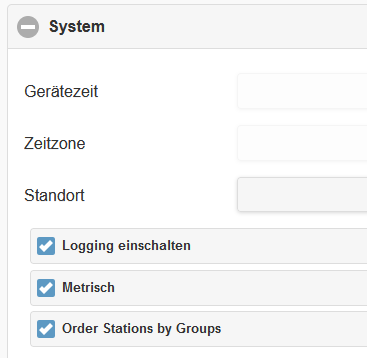
Also new: Via the menu at the bottom right, “Edit options”, then “System” and “Order Stations by Groups”, then the zones will be sorted by groups.
The groups are determined here:
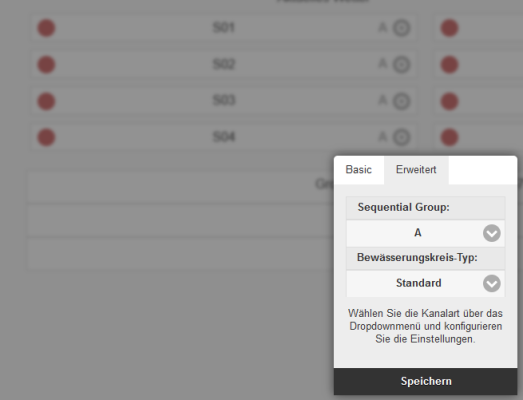
The P group represents a special case: all zones with group P are irrigated at the same time.
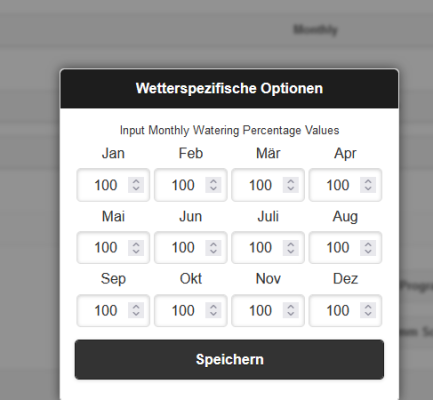
3. Weather specific method: Monthly values
With this method, the irrigation control can be adjusted using monthly specified values.