Shop
Shop Configurator
Generally
Example configuration USR-W610 and Truebner SMT100 RS485 Modbus
- The USR-W610 has the advantage that it also comes with the right power connection for the sensors.
- Up to 32 sensors can be connected to a Modbus port of a USR-W610 (at maximum expansion level, a more powerful power supply may be necessary)
- Currently only the Truebner SMT100, the Truebner Aquaflex and the Truebner T100 supports RS485 Modbus. Both soil moisture and soil temperature can be read. To connect multiple sensors, we recommend the Truebner TrueCon100.
- If only one sensor is used, broadcast address 253 can be used, otherwise each SMT100 must be assigned its own address. There is also the option in the OpenSprinkler app to change this when changing/adding a sensor (Set SMT100 Modbus Address)
- Since the USR-W610 supports WiFi and Ethernet, you need to decide which type of connection you need.
- STA mode: End device mode, connection possible via Ethernet OR Wifi
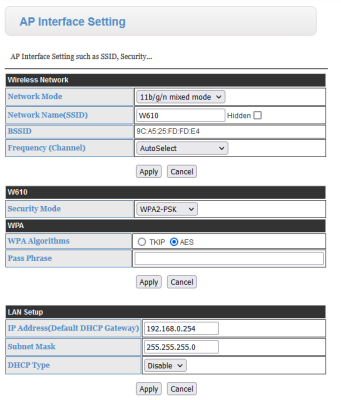
AP mode: Access point mode: Wifi is forwarded via Ethernet (not recommended for this application) - UART Data Transfer Mode: Modbus RTU
- Network Setting: Mode: Server, Protocol: TCP, IP: Free IP in the same network of the OpenSprinkler
- By the way: Our OpenSprinklers DIN rail holder Also fits the USR-W610!
- Note: The SMT100 is available in different versions, the RS485 versions with e.g. T-Bus or ASCII can be switched to Modbus using a Trueber utility program. However, the analog versions do not.
Configuration in detail:
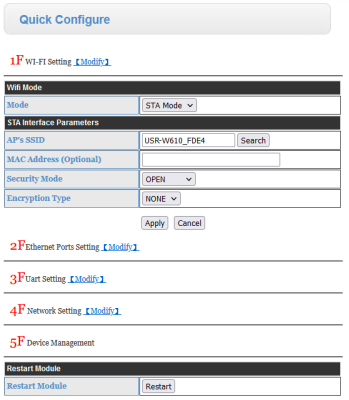

Choose here whether you want to use LAN (Ethernet) or WAN (WiFi).
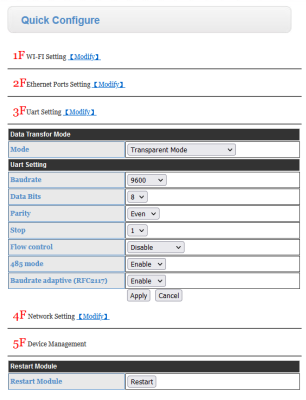 Attention: Select “RTU mode” under Mode!
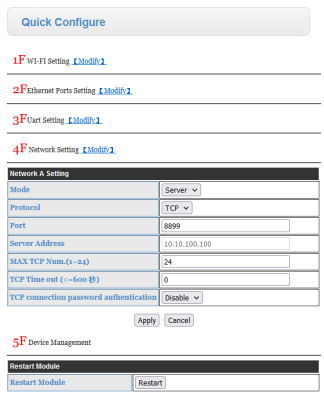 Port can be freely selected.