
 Shop
Shop Configurator
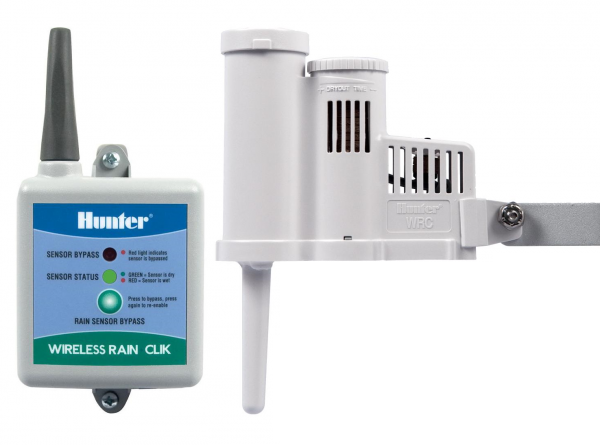
Most rain sensors must collect a certain amount of precipitation before a switch is activated, which stops the irrigation process on the controller and shuts down the system. Until this point, the system continues to use water unnecessarily. This is particularly problematic for environmentally conscious municipal, commercial and private users. The Hunter Rain-Clik and the Wireless Rain-Clik with integrated quick-response technology can trigger a switching process immediately after precipitation begins. The Rain-Clik can be attached to an eaves or any smooth vertical surface such as a wall or fence.
The Wireless Rain-Clik has 5 cables:
– 2x yellow for power supply. Only works with 24VAC! For the OpenSprinkler AC or OSPi, the two yellow cables can be connected to the contacts of the orange plug! This is not possible for the OpenSprinkler DC, you need a separate one 24VAC power supply.
– Orange, blue and white: Blue on GND and white on SN1/SN2 for “Normally closed” mode. Or blue to GND and orange to SN1/SN2 for “Normaly open” mode. Cover the end of the remaining cable with electrical tape.
In the OpenSprinkler settings menu at the bottom right / “Edit options”, then select “Weather and sensors”. A tick next to “Open” means “Normally open”, if you remove it it means “Normally closed”.
NEVER CONNECT TO COM! There is 24VAC alternating voltage at the COM, which can destroy the signal input! Use GND+SN1/SN2!
To test on the OpenSprinkler there is the test button, press it for at least 30s as the display reacts slowly.
You can use the bypass button on the receiver to check whether the OpenSprinkler reacts correctly.
The test button on the sensor can be used to check whether it is correctly connected to the receiver.
Download installation instructions
| Weight | 0.26kg |
|---|
Product safety
Manufacturer information
Hunter Industries
1940 Diamond Street
San Marcos
California 92078
USA
Be the first to review “Hunter WIRELESS RAIN-CLIK rain sensor WR-CLIK-TR”
Related products


Reviews
There are no reviews yet.