Shop
Shop Configurator
Admin

Forum Replies Created
-
AuthorPosts
-
Admin
Keymaster
 Keymaster
Hello, I think you connected something wrong. The outputs are switched completely digitally via the I2C bus. Either it switches or not at all. Unfortunately, you cannot see in the picture where the zone expander connection 1 is connected.
KeymasterIt's in the appendix of the OSPi instructions. Here's the link
https://openthings.freshdesk.com/support/home
-
This reply was modified 1 year, 7 months ago by
Admin.
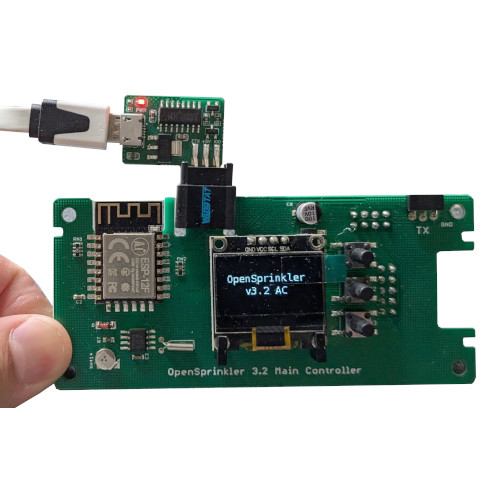
KeymasterImportant note when using the USB programming adapter: Never connect the USB adapter AND a power supply to the OpenSprinkler, as this can damage your PC! The power supply could flow into your PC via the USB interface and damage the interface!
The OpenSprinkler is powered via USB.
https://OpenSprinkler.com/wp-content/uploads/2024/08/usb-programmer-1.jpg
-
This reply was modified 1 year, 1 month ago by
5. July 2024 at 0:05 in reply to: Weather-dependent OpenSprinkler garden irrigation with Netatmo weather station #32446KeymasterNetatmo is now working again, but some manual work is required:
https://github.com/OpenSprinkler/OpenSprinkler-Weather/blob/master/docs/netatmo.md
KeymasterHello,
You can connect any 2-wire float switch. Then connect this to the OpenSprinkler on Gnd and Sn1/SN2.
E.g.
But what is the switch supposed to do, turn something on or off?
Keymaster29. June 2024 at 10:14 in reply to: OpenSprinkler Pi + Hunter PGV-101, power does not switch off #32384KeymasterCorrectly!
18. June 2024 at 5:20 in reply to: OpenSprinkler Pi + Hunter PGV-101, power does not switch off #32310Keymaster24VAC power supply (24 VDC | 1.5 A | 36Watt | Mean Well HDR-30-24)
But the Mean Well HDR-30-24 is a 24V DC power supply (AC/DC)! You cannot use this and will damage OSPi and the solenoid valves if used for a long time! Use a 24VAC power supply (AC/AC), i.e. 230V input voltage AC, 24V output voltage AC
Solenoid valve technology is based on this voltage.KeymasterAlready fixed
Keymaster“The request was too large” in the browser: She tries to access the page via https, but that doesn’t work. Use http!
Where IP address is the address of your Raspberry Pi.
https only works with a valid certificate using a web server/proxy.
This was described here:
https://OpenSprinklerShop.de/forums/topic/trick-nr-3-https-mit-ospi-und-raspberry-pi/KeymasterKeymasterSorry, had to fix the image upload function first.
KeymasterHello, unfortunately I have no idea about hardware modifications, so you would have to contact the manufacturer on OpenSprinkler.com.
However, you can also control GPIOs directly with the OpenSprinkler software and use a Raspberry Pi expansion board.
KeymasterHello,
The whole thing does NOT work with the original software, but only with the extended OpenSprinklerShop software.
https://OpenSprinklerShop.de/2023/09/06/neue-ospi-software-mit-analog-sensor-api/
And only with the “OpenSprinklerASB” app
-
This reply was modified 1 year, 7 months ago by
-
AuthorPosts